
How does TURNVELA work?
Give waiting guests a number and call them when the host is ready to assist. Calls use ticket numbers rather than publicly displayed visitor names.
Set up your queue
Create your location and the service customers will wait for. Display the daily QR code and access code at the entrance.
Take a number
Visitors receive an available number and can see how many people are ahead of them on their original device.
Call the next visitor
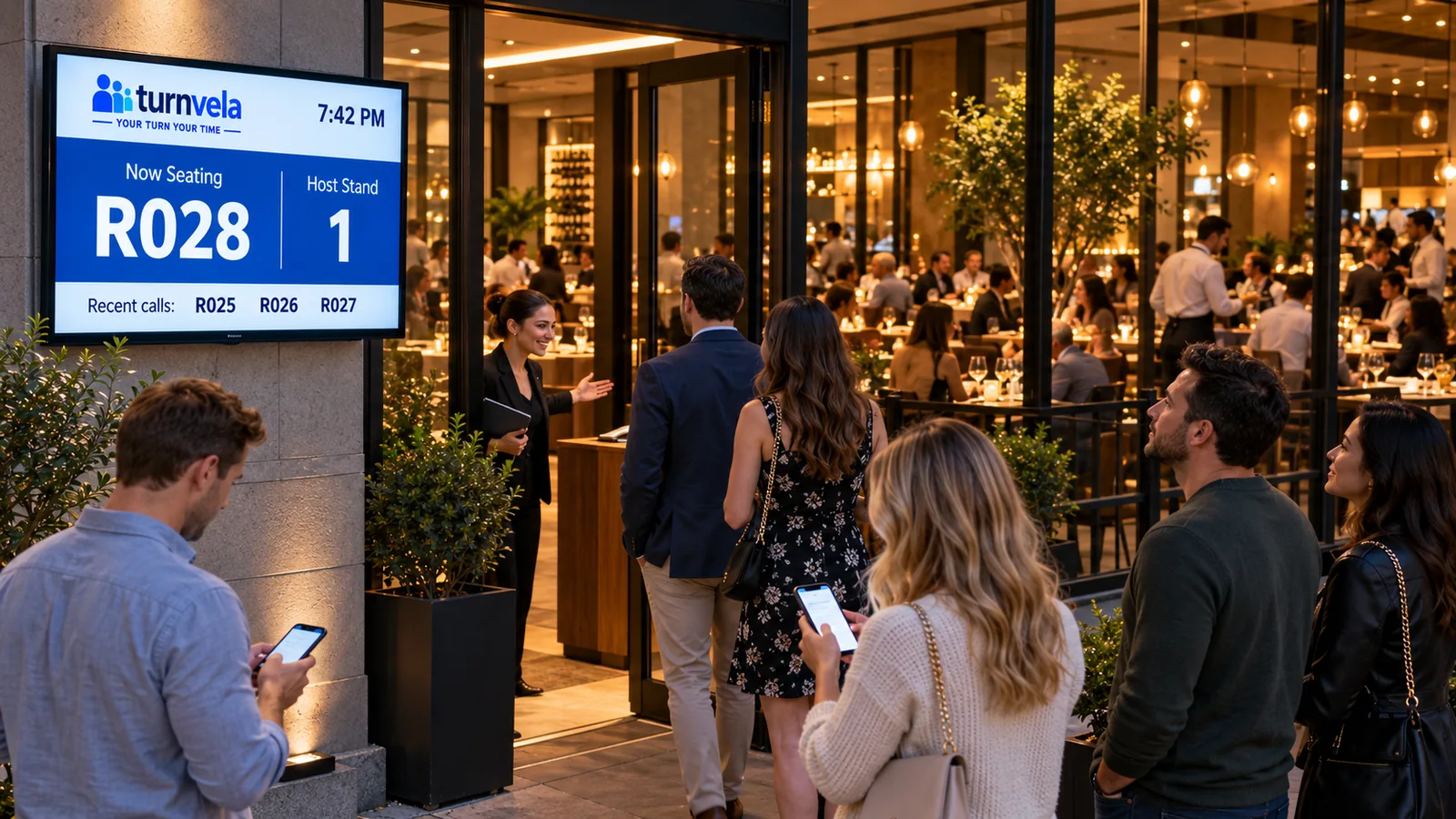
An employee calls the next number. The called number and service counter appear on the public display.
Example: waiting to speak with the host
Give waiting guests a number and call them when the host is ready to assist. If the location offers several services, the owner can create separate queues and assign them to the appropriate counters. Visitors do not need to install an app or create an account.
TURNVELA organizes waiting lines and service calls. It does not provide appointment scheduling, payments, order processing, or medical record management.
Why organize the wait for a restaurant table?
In restaurants, visitors may arrive together but need different services. When the line depends on verbal agreements or standing at a counter, the order can become unclear. A digital queue supports staff by making that order visible and calls easier to follow. With TURNVELA, visitors take a number without installing an app, while employees manage calls in a web browser.
During a busy dinner period, several parties may be waiting for a table. TURNVELA can provide a numbered line for speaking with the host or calling the next party when staff decide they can be seated. It does not know table capacity, party size, or dining duration, and it does not assign tables automatically. The host still checks whether an available table fits the party and the restaurant's situation.
A practical workflow for your location
If the restaurant accepts both reservations and walk-ins, keep those processes distinct. Walk-in guests can take a number while staff continue handling reserved tables through the existing procedure. Explain that a queue ticket is not a reservation or a guaranteed seating time. This helps set expectations during a busy period.
Start with one clearly named service and one active counter. Once that process works, add other queues only when staff need them. The owner sets hours and staff access, then checks how called numbers appear on the display. Visitors scan the daily QR code or enter the current daily access code to take a number. They follow the queue on the original device, and an employee calls the next person when ready.
What do visitors and employees see?
Visitors see their assigned number, queue status, and the number of people ahead. That helps them follow their turn, but it is not an exact estimate in minutes. Different service needs and unexpected interruptions can affect calls. When a number is called, the visitor should follow the counter label and any staff instructions.
Employees have controls for calling the next number, repeating a call, and handling missed calls. Staff need an agreed policy for someone who does not respond: when to repeat the call and whether the person can return to the queue. Explain these rules before the first shift. TURNVELA supports a consistent process; the location still needs clear operating procedures.
Practical challenges and limitations
Place the display where guests can notice a call without standing at the host stand. For a restaurant with outdoor seating, check visibility and internet access in the waiting area. Staff need a consistent repeat-call policy for guests who do not respond.
A digital queue should not be presented as a guarantee of faster service. It can reduce the need to stand at the counter and make calls easier to follow. If staffing is insufficient or the process has a bottleneck, an app alone will not remove the cause of the wait. Observe actual problems and adjust the workflow gradually instead of adding features without a clear need.
Get started without complicated equipment
Decide where to place the QR poster and check whether customers can read the display from the waiting area. Rehearse ticket taking on two different phones, review the call display, and check the break procedure. Show the current daily code clearly; old daily codes must not be used to issue new tickets. Provide a short alternative instruction for people who cannot scan.
TURNVELA is currently free during the public beta, with no credit card required. Paid plans may be introduced with advance notice. To try the system at your location, open business registration, and compare other examples in the industry directory or blog guides.
Common workflow questions
Do visitors need an account?
No. Visitors can take a number using the daily QR code or access code without registering or installing an app.
Can the system promise an exact wait time?
No. The number of people ahead is not a guaranteed wait time. Service lengths and the number of available counters can vary.
What if a visitor does not have a smartphone?
Provide staff assistance with issuing a number and a readable public display for following calls.
Frequently asked questions
How does TURNVELA help this type of business?
Give waiting guests a number and call them when the host is ready to assist. Visitors can see their number and queue status on their phone.
Do we need a dedicated ticket dispenser?
No. Visitors can scan a QR code or enter the daily access code on the website. A compatible existing TV or screen can be used for the public display.
Is an app installation required?
No. Visitors and employees use TURNVELA through a web browser.
Is TURNVELA free?
Yes, during the public beta. Paid plans may be introduced with advance notice. There is no automatic billing.